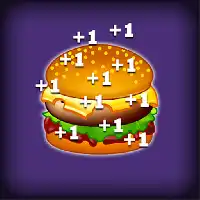
BURGER CLICKER













SIMILAR GAMES
































Game Description


Burger Clicker - KBH Games
About Burger Clicker - KBH Games
Burger Clicker is an addictive online clicker game hosted on KBH Games that lets players build a virtual fast‑food empire by tapping, upgrading, and managing resources. The core loop revolves around earning coins through repeated clicks, then spending those coins on upgrades that increase click power, automate earnings, or unlock new menu items.
The game features a colorful interface, simple controls, and a progression system that rewards strategic planning. Players can unlock a variety of burgers, each offering unique bonuses, and combine them with special items that boost click efficiency. As the player advances, the challenge scales, introducing new layers of complexity such as time‑limited events and seasonal themes.
Gameplay Overview
In Burger Clicker, every click generates a small amount of currency. The amount can be increased by purchasing click multipliers or by installing automatic generators that produce currency over time. Early in the game, the focus is on accumulating enough currency to unlock the first set of upgrades. Once unlocked, players can invest in menu expansions, which add new burger types and associated boosts.
Each new burger type introduces a distinct passive bonus. For example, a Cheeseburger may increase click yields by a fixed percentage, while a Double‑Patty could grant bonus clicks when a certain threshold is reached. Strategic placement of these upgrades determines how quickly a player can scale their earnings.
How to Play
- Start by clicking the central burger icon repeatedly to generate initial coins.
- Open the upgrade menu and purchase the first click power upgrade to increase coin yield per click.
- Invest in automated generators such as “Fry‑Station” or “Drink Dispenser” to earn passive income.
- Continue to unlock new burger varieties, each providing unique multipliers or special abilities.
- Participate in limited‑time events to earn exclusive items that further accelerate progression.
Upgrade Strategies
Effective progression relies on balancing immediate gains with long‑term growth. Early upgrades should prioritize increasing click power, as this directly boosts the rate at which coins are collected. Once a steady income is established, players should allocate resources toward upgrades that provide passive bonuses, thereby reducing the need for constant manual clicking.
Key strategies include:
- Prioritizing upgrades that multiply click yield before investing in automation.
- Balancing between new burger unlocks and enhancements that boost existing items.
- Monitoring event calendars to time purchases of limited‑edition boosters.
- Utilizing the “Combo” feature, which grants additional bonuses when specific burger sets are assembled.
Community and Leaderboards
The KBH Games platform hosts a vibrant community of Burger Clicker players who share tips, strategies, and high‑score achievements. Leaderboards display the top earners based on total coins, highest burger tier, and event rankings. Engaging with the community can provide valuable insights into emerging meta‑strategies and upcoming feature releases.
Players often form informal groups to coordinate event participation, ensuring collective rewards that benefit all members. Sharing screenshots of impressive progress or discussing optimal upgrade orders helps newcomers accelerate their learning curve.
Event Participation
Seasonal events introduce temporary objectives that, when completed, grant exclusive items or permanent boosts. These events typically feature unique themes such as “Halloween Burger Bash” or “Summer BBQ Blitz,” each offering distinct gameplay twists.
- Event objectives may require achieving a specific coin total within a set timeframe.
- Special event burgers often possess enhanced multipliers compared to standard items.
- Completing event challenges unlocks decorative elements that customize the player’s interface.
Progress Tracking
Burger Clicker includes a detailed progress dashboard that visualizes earnings, upgrade levels, and upcoming milestones. The dashboard provides real‑time feedback on click efficiency, passive income rates, and the projected time needed to reach the next major upgrade.
Key metrics displayed include:
- Total coins accumulated.
- Current click multiplier.
- Passive income per second.
- Estimated time to next upgrade based on current production rate.
Future Updates
The development team behind Burger Clicker regularly releases patches that introduce new features, balance existing mechanics, and expand the game’s content library. Anticipated updates include:
- Introduction of multiplayer modes that allow simultaneous competition.
- Expanded storyline elements that add narrative depth to the burger‑building experience.
- Advanced customization options for player avatars and restaurant themes.
Staying informed about these updates ensures that players can adapt their strategies and continue to enjoy fresh content.
Overall, Burger Clicker offers a compelling blend of simplicity and depth, making it accessible to casual players while providing enough strategic nuance to keep experienced clicker enthusiasts engaged. The game’s integration with KBH Games ensures a seamless experience, allowing players to jump straight into the action without unnecessary setup. Whether aiming for high scores on the leaderboards or simply enjoying the satisfying cycle of upgrades, Burger Clicker delivers a rewarding and endlessly replayable experience.
Play Burger Clicker for free on KBH Games, the top destination for KBH Games unblocked in the USA! Enjoy thousands of top-tier, browser-based games with no ads and instant access—perfect for school, work, or home. Whether you love action, puzzles, or sports, start playing with just a click or keyboard tap!
Why Choose KBH Games?
Unblocked games are a lifesaver when gaming sites are restricted. At KBH Games, we offer:
- Thousands of Games: Action, puzzles, sports, and more.
- No Downloads: Play instantly in your browser.
- Ad-Free Experience: Focus on fun, not pop-ups.
- Accessible Anywhere: Bypass school or work filters with ease.
Our platform is your go-to hub for free unblocked games, delivering endless entertainment wherever you are.
How to Play Unblocked Games on KBH Games
Getting started is simple! Follow these steps to enjoy unblocked games on KBH Games:
- Visit the Site: Open Chrome, Firefox, or Edge and go to KBH Games. No downloads needed!
- Browse Games: Explore our library of unblocked games—action, adventure, puzzles, and more.
- Pick a Game: Click a title to launch it in fullscreen mode instantly.
- Play Right Away: Most games load in seconds. Adjust settings if available.
- Bypass Blocks: Use our .io/GitLab link to access games on restricted networks.
- Enjoy Ad-Free Fun: Immerse yourself without interruptions.
Game Controls for Top Unblocked Games
Master your favorite unblocked games with these common controls. Check each game’s instructions for specifics.
Action & Platformers (e.g., Stickman, Retro Bowl)
- Arrow Keys/WASD: Move or jump.
- Spacebar: Attack or special moves.
- Shift: Sprint or dodge.
- Mouse Click: Aim or interact.
Puzzles & Strategy (e.g., 2048, Geometry Dash)
- Arrow Keys: Navigate elements.
- Mouse Click/Drag: Select or move items.
- Spacebar: Pause or confirm.
- Enter: Start/restart.
Sports & Racing (e.g., Slope Game)
- Arrow Keys/WASD: Steer or move.
- Spacebar: Jump or accelerate.
- Shift: Brake or boost.
- Mouse: Adjust angles.
Multiplayer & Arcade (e.g., Slither.io)
- Mouse: Guide your character.
- Left Click: Boost or activate.
- Arrow Keys: Move (some titles).
- Spacebar: Pause or special moves.
Tips for Smooth Gameplay on KBH Games
Maximize your fun with these pro tips:
- Read Instructions: Check tutorials on the start screen.
- Adjust Settings: Tweak graphics for lag-free play.
- Use Responsive Gear: Ensure your keyboard/mouse works well.
- Bookmark Us: Save KBH Games for quick access.
- Troubleshoot: Refresh or switch browsers if needed.