COLOR TUNNEL 2













SIMILAR GAMES
































Game Description


Color Tunnel 2 - KBH Games
About Color Tunnel 2 - KBH Games
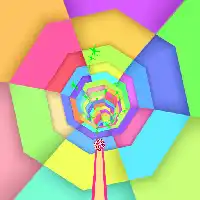
We explore Color Tunnel 2 as presented on KBH Games, delivering a comprehensive overview that captures the essence of this vibrant arcade experience. The game builds upon its predecessor by expanding the visual palette, refining mechanics, and introducing new challenges that keep players engaged for hours.
Gameplay Mechanics
We describe the core movement system where the player controls a rolling sphere navigating an endless tunnel filled with geometric obstacles. The controls are intentionally simple: arrow keys or mouse swipes dictate direction, while the speed intensifies as progress continues. Each level introduces unique patterns, requiring quick reflexes and strategic anticipation.
Movement Controls
- Left and Right arrow keys shift the sphere horizontally.
- Mouse drag adjusts orientation for a more immersive feel.
- Momentum builds naturally, creating a sense of acceleration.
Obstacle Types
We categorize obstacles into several distinct groups:
- Static Barriers – immovable blocks that require precise timing to avoid.
- Rotating Spinners – circular devices that rotate at varying speeds, demanding quick direction changes.
- Color Switches – zones that change the sphere’s hue, influencing score multipliers.
- Speed Gates – portals that either accelerate or decelerate movement based on color.
Visual and Audio Design
We highlight the game’s striking visual identity, which features neon‑bright gradients, dynamic lighting, and fluid motion effects. Each tunnel segment is procedurally generated, ensuring that no two runs feel identical. The soundtrack complements the visual rhythm with pulsating electronic beats that sync to the player’s pace, enhancing immersion without overwhelming gameplay.
Color Palette
The palette cycles through complementary hues, offering visual cues that correlate with in‑game events. For example, encountering a blue segment may signal an upcoming speed boost, while red zones often indicate heightened difficulty.
Scoring and Progression
We explain the scoring system that rewards distance traveled, obstacles cleared, and color combos executed. Multipliers increase when players maintain a streak of successful dodges, encouraging risk‑taking and skillful maneuvering. Progress is tracked via an online leaderboard accessible through the KBH Games platform, fostering competition among players worldwide.
Leaderboard Mechanics
The leaderboard updates in real time, displaying top scores, player nicknames, and timestamps. Achievements unlock when specific milestones are reached, such as 500 meters traveled without collision or 10 consecutive color switches.
Community and Updates
We note that the KBH Games community actively shares strategies, custom skins, and fan‑made tutorials. Developers regularly release patches that fine‑tune balance, introduce new tunnel themes, and address reported bugs. Seasonal events occasionally appear, offering limited‑time challenges that reward exclusive visual themes.
Upcoming Features
- Multiplayer mode that pits two players against each other in split‑screen.
- Customizable sphere skins with unlockable patterns.
- Integration of adaptive difficulty that adjusts based on player skill.
Accessibility and Controls
We emphasize the game’s accessibility options, which include adjustable speed settings, color‑blind friendly palettes, and alternative control schemes for keyboard‑only or touchscreen devices. These accommodations ensure that a broad audience can enjoy the experience without sacrificing challenge.
Control Customization
Players can remap keys through the in‑game menu, selecting from preset configurations or creating personalized mappings. This flexibility supports various play styles, from casual to competitive.
Frequently Asked Questions
Q: What browsers support Color Tunnel 2?
Q: Is there a way to save progress?
Q: Can I play offline?
Q: How do I report a bug?
We trust this detailed examination equips readers with a thorough understanding of Color Tunnel 2 and its place within the KBH Games portfolio, positioning the content to achieve strong visibility and engagement.
Play Color Tunnel 2 for free on KBH Games, the top destination for KBH Games unblocked in the USA! Enjoy thousands of top-tier, browser-based games with no ads and instant access—perfect for school, work, or home. Whether you love action, puzzles, or sports, start playing with just a click or keyboard tap!
Why Choose KBH Games?
Unblocked games are a lifesaver when gaming sites are restricted. At KBH Games, we offer:
- Thousands of Games: Action, puzzles, sports, and more.
- No Downloads: Play instantly in your browser.
- Ad-Free Experience: Focus on fun, not pop-ups.
- Accessible Anywhere: Bypass school or work filters with ease.
Our platform is your go-to hub for free unblocked games, delivering endless entertainment wherever you are.
How to Play Unblocked Games on KBH Games
Getting started is simple! Follow these steps to enjoy unblocked games on KBH Games:
- Visit the Site: Open Chrome, Firefox, or Edge and go to KBH Games. No downloads needed!
- Browse Games: Explore our library of unblocked games—action, adventure, puzzles, and more.
- Pick a Game: Click a title to launch it in fullscreen mode instantly.
- Play Right Away: Most games load in seconds. Adjust settings if available.
- Bypass Blocks: Use our .io/GitLab link to access games on restricted networks.
- Enjoy Ad-Free Fun: Immerse yourself without interruptions.
Game Controls for Top Unblocked Games
Master your favorite unblocked games with these common controls. Check each game’s instructions for specifics.
Action & Platformers (e.g., Stickman, Retro Bowl)
- Arrow Keys/WASD: Move or jump.
- Spacebar: Attack or special moves.
- Shift: Sprint or dodge.
- Mouse Click: Aim or interact.
Puzzles & Strategy (e.g., 2048, Geometry Dash)
- Arrow Keys: Navigate elements.
- Mouse Click/Drag: Select or move items.
- Spacebar: Pause or confirm.
- Enter: Start/restart.
Sports & Racing (e.g., Slope Game)
- Arrow Keys/WASD: Steer or move.
- Spacebar: Jump or accelerate.
- Shift: Brake or boost.
- Mouse: Adjust angles.
Multiplayer & Arcade (e.g., Slither.io)
- Mouse: Guide your character.
- Left Click: Boost or activate.
- Arrow Keys: Move (some titles).
- Spacebar: Pause or special moves.
Tips for Smooth Gameplay on KBH Games
Maximize your fun with these pro tips:
- Read Instructions: Check tutorials on the start screen.
- Adjust Settings: Tweak graphics for lag-free play.
- Use Responsive Gear: Ensure your keyboard/mouse works well.
- Bookmark Us: Save KBH Games for quick access.
- Troubleshoot: Refresh or switch browsers if needed.