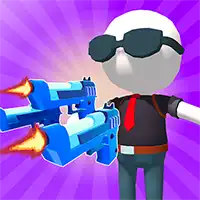
GUN FEST












SIMILAR GAMES
































Game Description


Gun Fest - KBH Games
About Gun Fest - KBH Games
Gun Fest is a dynamic shooting experience hosted on the KBH Games platform. This title blends fast-paced combat with strategic progression, offering players a variety of maps, weapons, and challenges. The game emphasizes skillful aim, quick reflexes, and teamwork, making each match unpredictable and engaging.
Developers continuously refine the gameplay based on community feedback, ensuring that the experience stays fresh and competitive. Players can jump into quick matches or dive into longer sessions that reward persistence and mastery.
Key Elements of Gun Fest
The core of Gun Fest revolves around its diverse arsenal and map design. Each weapon category offers distinct characteristics, from rapid-fire pistols to high-damage shotguns. Maps are crafted to support varied playstyles, featuring open arenas, tight corridors, and strategic choke points.
Weapons and Gear
Players can equip a wide range of firearms and accessories. Notable weapons include:
- Assault Rifles – Balanced rate of fire and damage.
- Sniper Rifles – Long-range precision with high impact.
- Shotguns – Devastating close-quarters damage.
- Grenade Launchers – Area control and crowd management.
Additionally, players can unlock special gear such as armored helmets, tactical backpacks, and performance-boosting attachments.
Game Modes
Gun Fest offers several competitive modes:
- Team Deathmatch – Two teams battle to achieve the highest kill count.
- Capture the Flag – Teams compete to secure and defend a flag.
- Free-for-All – Every player fights for themselves in a survival scenario.
- Bot Skirmish – Practice against AI opponents to hone skills.
Each mode includes customizable match settings, allowing players to adjust time limits, score thresholds, and difficulty levels.
Mastering Gameplay Mechanics
Success in Gun Fest depends on understanding and applying key mechanics:
Movement – Efficient strafing and jumping can dodge incoming fire.
Aiming – Consistent aim is crucial; practice in training ranges improves accuracy.
Reloading – Managing reload timing prevents exposure to enemy fire.
Map Awareness – Knowing the layout helps in positioning and ambush opportunities.
Strategic Tips
Players can adopt several strategies to dominate matches:
- Control central points to gain tactical advantage.
- Utilize cover effectively to reduce incoming damage.
- Communicate with teammates for coordinated attacks.
- Adapt loadouts based on the current map and mode.
- Observe opponent patterns to anticipate movements.
Implementing these tactics can significantly increase win rates and overall enjoyment.
Community Interaction
The KBH Games community actively participates in Gun Fest through forums, streams, and competitive tournaments. Players share tips, organize squad matches, and provide feedback that shapes future updates. Engaging with the community enhances skill development and keeps the experience socially rewarding.
Multiplayer Features
Gun Fest supports both solo and team-based play. Key multiplayer functionalities include:
- Friend invites for private matches.
- Matchmaking that pairs players of similar skill levels.
- Leaderboards tracking personal and team achievements.
- Seasonal events offering exclusive rewards.
These features foster a vibrant and competitive environment.
Future Developments
Developers have announced plans to expand Gun Fest with new content:
- Additional maps featuring unique terrain and objectives.
- New weapon categories and customization options.
- Enhanced graphics and performance optimizations.
- Integration of seasonal story events to deepen lore.
Upcoming patches will also address balance issues and incorporate community-suggested improvements, ensuring the game evolves in line with player expectations.
Getting Started with Gun Fest
New players can quickly begin their journey by following these steps:
- Visit https://kbhgame.gitlab.io/ and create an account.
- Navigate to the Gun Fest section in the game library.
- Select a preferred loadout and practice in the training area.
- Join a public match to experience real-time combat.
- Progression through wins and challenges unlocks new weapons and gear.
Following this roadmap allows newcomers to become proficient and fully immersed in the action.
Play Gun Fest for free on KBH Games, the top destination for KBH Games unblocked in the USA! Enjoy thousands of top-tier, browser-based games with no ads and instant access—perfect for school, work, or home. Whether you love action, puzzles, or sports, start playing with just a click or keyboard tap!
Why Choose KBH Games?
Unblocked games are a lifesaver when gaming sites are restricted. At KBH Games, we offer:
- Thousands of Games: Action, puzzles, sports, and more.
- No Downloads: Play instantly in your browser.
- Ad-Free Experience: Focus on fun, not pop-ups.
- Accessible Anywhere: Bypass school or work filters with ease.
Our platform is your go-to hub for free unblocked games, delivering endless entertainment wherever you are.
How to Play Unblocked Games on KBH Games
Getting started is simple! Follow these steps to enjoy unblocked games on KBH Games:
- Visit the Site: Open Chrome, Firefox, or Edge and go to KBH Games. No downloads needed!
- Browse Games: Explore our library of unblocked games—action, adventure, puzzles, and more.
- Pick a Game: Click a title to launch it in fullscreen mode instantly.
- Play Right Away: Most games load in seconds. Adjust settings if available.
- Bypass Blocks: Use our .io/GitLab link to access games on restricted networks.
- Enjoy Ad-Free Fun: Immerse yourself without interruptions.
Game Controls for Top Unblocked Games
Master your favorite unblocked games with these common controls. Check each game’s instructions for specifics.
Action & Platformers (e.g., Stickman, Retro Bowl)
- Arrow Keys/WASD: Move or jump.
- Spacebar: Attack or special moves.
- Shift: Sprint or dodge.
- Mouse Click: Aim or interact.
Puzzles & Strategy (e.g., 2048, Geometry Dash)
- Arrow Keys: Navigate elements.
- Mouse Click/Drag: Select or move items.
- Spacebar: Pause or confirm.
- Enter: Start/restart.
Sports & Racing (e.g., Slope Game)
- Arrow Keys/WASD: Steer or move.
- Spacebar: Jump or accelerate.
- Shift: Brake or boost.
- Mouse: Adjust angles.
Multiplayer & Arcade (e.g., Slither.io)
- Mouse: Guide your character.
- Left Click: Boost or activate.
- Arrow Keys: Move (some titles).
- Spacebar: Pause or special moves.
Tips for Smooth Gameplay on KBH Games
Maximize your fun with these pro tips:
- Read Instructions: Check tutorials on the start screen.
- Adjust Settings: Tweak graphics for lag-free play.
- Use Responsive Gear: Ensure your keyboard/mouse works well.
- Bookmark Us: Save KBH Games for quick access.
- Troubleshoot: Refresh or switch browsers if needed.