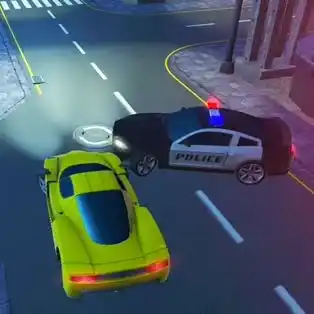
PARKING FURY 3D: BEACH CITY















SIMILAR GAMES
































Game Description


Parking Fury 3D: Beach City - KBH Games
About Parking Fury 3D: Beach City - KBH Games
Experience the ultimate parking challenge in a vibrant coastal metropolis where every street, alley, and waterfront lot offers a unique test of skill. This 3D parking simulation brings realistic physics, stunning visuals, and a variety of vehicles to master, all hosted on the official KBH Games platform.
Game Overview
Set against a sun‑kissed shoreline, players navigate through densely packed parking zones, towering parking structures, and open‑air lots that mimic real‑world beach city environments. The objective is simple yet demanding: park each car precisely within the marked space while avoiding obstacles, pedestrians, and time constraints.
Key Features
- Diverse Vehicle Selection – Choose from compact hatchbacks, sleek sports cars, massive SUVs, and luxury sedans, each with distinct handling characteristics.
- Realistic Physics Engine – Experience accurate weight distribution, tire grip, and momentum that reflect true driving dynamics.
- Dynamic Weather Conditions – Adjust to shifting sunlight, occasional rain showers, and reflective wet surfaces that affect visibility and control.
- Progressive Difficulty Levels – Advance through increasingly complex parking scenarios that require precision and strategic planning.
- Score-Based Rewards – Earn points for perfect parking, speed, and minimal collisions, unlocking new cars and customization options.
Gameplay Mechanics
Players control their selected vehicle using intuitive keyboard or touch inputs, maneuvering into tight spots with the aid of on‑screen guides and mirror perspectives. The game incorporates a hint system that highlights optimal parking angles, while also allowing experienced players to rely on pure skill.
Each level presents a specific parking target, such as parallel parking between two bustling cafés, perpendicular parking in a crowded lot, or angled parking within a multi‑story garage. Completing a level without damage grants a performance rating that influences future challenges.
Mission Structure
- Beginner – Introduce basic parking techniques in open lots.
- Intermediate – Add pedestrian traffic and tighter spaces.
- Advanced – Incorporate speed limits, time penalties, and moving obstacles.
- Expert – Require multi‑step parking sequences and precise entry angles.
Visual and Audio Design
The game showcases high‑resolution textures for buildings, palm trees, and coastal landscapes, creating an immersive beach city vibe. Lighting effects simulate realistic sun flares and reflective wet surfaces, enhancing visual fidelity. Complementary sound design features ambient city noises, gentle waves, and subtle engine roars that reinforce the environment's authenticity.
Customization Options
Unlockable customization includes paint colors, wheel designs, and interior accessories. Each upgrade not only personalizes the vehicle but also subtly influences handling parameters, allowing players to tailor their driving experience to personal preference.
How to Play
Access the game directly through the KBH Games website, select Parking Fury 3D: Beach City from the menu, and choose your preferred vehicle. Follow on‑screen tutorials to familiarize yourself with controls, then dive into the first level to test your parking prowess.
For developers interested in integrating similar experiences, the KBH Games repository provides documentation and asset libraries that can be leveraged for custom projects.
Conclusion
Parking Fury 3D: Beach City delivers an engaging blend of realism, challenge, and aesthetic appeal, making it a standout title within the parking simulation genre. Whether you are a casual gamer seeking quick entertainment or a seasoned player aiming for perfection, the game offers endless opportunities to refine your parking skills in a vibrant beachside setting.
Play Parking Fury 3D: Beach City for free on KBH Games, the top destination for KBH Games unblocked in the USA! Enjoy thousands of top-tier, browser-based games with no ads and instant access—perfect for school, work, or home. Whether you love action, puzzles, or sports, start playing with just a click or keyboard tap!
Why Choose KBH Games?
Unblocked games are a lifesaver when gaming sites are restricted. At KBH Games, we offer:
- Thousands of Games: Action, puzzles, sports, and more.
- No Downloads: Play instantly in your browser.
- Ad-Free Experience: Focus on fun, not pop-ups.
- Accessible Anywhere: Bypass school or work filters with ease.
Our platform is your go-to hub for free unblocked games, delivering endless entertainment wherever you are.
How to Play Unblocked Games on KBH Games
Getting started is simple! Follow these steps to enjoy unblocked games on KBH Games:
- Visit the Site: Open Chrome, Firefox, or Edge and go to KBH Games. No downloads needed!
- Browse Games: Explore our library of unblocked games—action, adventure, puzzles, and more.
- Pick a Game: Click a title to launch it in fullscreen mode instantly.
- Play Right Away: Most games load in seconds. Adjust settings if available.
- Bypass Blocks: Use our .io/GitLab link to access games on restricted networks.
- Enjoy Ad-Free Fun: Immerse yourself without interruptions.
Game Controls for Top Unblocked Games
Master your favorite unblocked games with these common controls. Check each game’s instructions for specifics.
Action & Platformers (e.g., Stickman, Retro Bowl)
- Arrow Keys/WASD: Move or jump.
- Spacebar: Attack or special moves.
- Shift: Sprint or dodge.
- Mouse Click: Aim or interact.
Puzzles & Strategy (e.g., 2048, Geometry Dash)
- Arrow Keys: Navigate elements.
- Mouse Click/Drag: Select or move items.
- Spacebar: Pause or confirm.
- Enter: Start/restart.
Sports & Racing (e.g., Slope Game)
- Arrow Keys/WASD: Steer or move.
- Spacebar: Jump or accelerate.
- Shift: Brake or boost.
- Mouse: Adjust angles.
Multiplayer & Arcade (e.g., Slither.io)
- Mouse: Guide your character.
- Left Click: Boost or activate.
- Arrow Keys: Move (some titles).
- Spacebar: Pause or special moves.
Tips for Smooth Gameplay on KBH Games
Maximize your fun with these pro tips:
- Read Instructions: Check tutorials on the start screen.
- Adjust Settings: Tweak graphics for lag-free play.
- Use Responsive Gear: Ensure your keyboard/mouse works well.
- Bookmark Us: Save KBH Games for quick access.
- Troubleshoot: Refresh or switch browsers if needed.