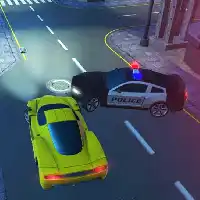
PARKING FURY 3D















SIMILAR GAMES
































Game Description


Parking Fury 3D - KBH Games
About Parking Fury 3D - KBH Games
We deliver an immersive Parking Fury 3D experience that challenges players to master precision driving within a vibrant virtual city. The game combines realistic physics with intuitive controls, allowing users to navigate tight streets, execute sharp turns, and park vehicles with pixel-perfect accuracy. Every level introduces new obstacles, varied environments, and escalating difficulty, ensuring sustained engagement for both casual gamers and seasoned drivers.
Gameplay Overview
We design each mission to test specific aspects of spatial awareness and hand‑eye coordination. From bustling downtown avenues to quiet residential alleys, the settings replicate diverse urban landscapes. Players assume the role of a professional driver tasked with completing parking challenges under time constraints, thereby sharpening reflexes and strategic planning.
Core Mechanics
We implement a robust physics engine that governs vehicle momentum, weight distribution, and collision response. The control scheme supports both keyboard and touch inputs, providing flexibility across devices. Steering sensitivity, brake responsiveness, and accelerator tuning can be adjusted to suit personal preferences, enabling a customized driving feel.
- Accurate steering for tight maneuvering.
- Dynamic collision detection for realistic feedback.
- Adjustable difficulty levels to accommodate all skill tiers.
- Diverse vehicle roster ranging from compact sedans to bulky trucks.
Features and Highlights
We embed a suite of features that elevate Parking Fury 3D beyond conventional parking simulations. High‑definition graphics render detailed textures, reflective surfaces, and realistic lighting, creating an authentic atmosphere. The sound design incorporates ambient city noises, engine roars, and subtle auditory cues that guide players toward optimal parking positions.
- Multiple camera angles offering perspective flexibility.
- Replay system for reviewing and refining techniques.
- Achievement milestones that track progress and reward mastery.
- Leaderboards fostering competitive play among peers.
Visual Design
We prioritize visual fidelity by integrating high‑resolution assets and optimized rendering pipelines. Each environment showcases distinct architectural styles, ranging from sleek modern skyscrapers to historic brick facades. Dynamic weather effects, such as rain‑slicked streets and varying daylight conditions, add depth and realism to the visual tableau.
User Experience
We craft an intuitive user interface that streamlines menu navigation and in‑game HUD elements. On‑screen instructions present clear objectives, while progress bars display time remaining and performance metrics. The design emphasizes minimal clutter, allowing players to focus on the core driving challenge without distraction.
- Select a vehicle from the garage.
- Choose a mission type and difficulty setting.
- Navigate the city map to the designated parking spot.
- Execute precise maneuvers to secure the parking space.
- Earn rewards based on speed, accuracy, and style.
Progression System
We structure progression through a tiered reward scheme that unlocks new vehicles, customization options, and advanced levels. Successful completions grant experience points, which contribute to leveling up the player profile. Each level introduces novel obstacles, such as moving obstacles, narrow alleys, and heightened time limits, thereby maintaining a fresh and challenging experience.
Community and Updates
We actively engage with the player community by incorporating feedback into regular updates. New content additions include seasonal events, extra maps, and expanded vehicle collections. The development team monitors forum discussions and social media channels to address bug reports and implement quality‑of‑life improvements promptly.
- Weekly challenges that rotate fresh objectives.
- Seasonal events featuring themed environments and exclusive rewards.
- Bug fix patches delivered on a bi‑weekly schedule.
- Feature roadmap outlining upcoming enhancements.
How to Access and Play
We host Parking Fury 3D on the official platform accessible via KBH Game. Users can launch the game directly through the website, eliminating the need for external downloads or installations. The browser‑based architecture ensures quick loading times and seamless integration across desktop and mobile devices.
- Visit the official page at KBH Game.
- Select Parking Fury 3D from the game catalog.
- Choose a control method—keyboard, mouse, or touchscreen.
- Pick a mission, adjust settings, and begin driving.
- Save progress automatically to continue later.
We invite players to explore the dynamic world of Parking Fury 3D, refine their parking expertise, and compete for top rankings. Continuous updates and community‑driven enhancements guarantee a constantly evolving experience that keeps enthusiasts returning for fresh challenges.
Play Parking Fury 3D for free on KBH Games, the top destination for KBH Games unblocked in the USA! Enjoy thousands of top-tier, browser-based games with no ads and instant access—perfect for school, work, or home. Whether you love action, puzzles, or sports, start playing with just a click or keyboard tap!
Why Choose KBH Games?
Unblocked games are a lifesaver when gaming sites are restricted. At KBH Games, we offer:
- Thousands of Games: Action, puzzles, sports, and more.
- No Downloads: Play instantly in your browser.
- Ad-Free Experience: Focus on fun, not pop-ups.
- Accessible Anywhere: Bypass school or work filters with ease.
Our platform is your go-to hub for free unblocked games, delivering endless entertainment wherever you are.
How to Play Unblocked Games on KBH Games
Getting started is simple! Follow these steps to enjoy unblocked games on KBH Games:
- Visit the Site: Open Chrome, Firefox, or Edge and go to KBH Games. No downloads needed!
- Browse Games: Explore our library of unblocked games—action, adventure, puzzles, and more.
- Pick a Game: Click a title to launch it in fullscreen mode instantly.
- Play Right Away: Most games load in seconds. Adjust settings if available.
- Bypass Blocks: Use our .io/GitLab link to access games on restricted networks.
- Enjoy Ad-Free Fun: Immerse yourself without interruptions.
Game Controls for Top Unblocked Games
Master your favorite unblocked games with these common controls. Check each game’s instructions for specifics.
Action & Platformers (e.g., Stickman, Retro Bowl)
- Arrow Keys/WASD: Move or jump.
- Spacebar: Attack or special moves.
- Shift: Sprint or dodge.
- Mouse Click: Aim or interact.
Puzzles & Strategy (e.g., 2048, Geometry Dash)
- Arrow Keys: Navigate elements.
- Mouse Click/Drag: Select or move items.
- Spacebar: Pause or confirm.
- Enter: Start/restart.
Sports & Racing (e.g., Slope Game)
- Arrow Keys/WASD: Steer or move.
- Spacebar: Jump or accelerate.
- Shift: Brake or boost.
- Mouse: Adjust angles.
Multiplayer & Arcade (e.g., Slither.io)
- Mouse: Guide your character.
- Left Click: Boost or activate.
- Arrow Keys: Move (some titles).
- Spacebar: Pause or special moves.
Tips for Smooth Gameplay on KBH Games
Maximize your fun with these pro tips:
- Read Instructions: Check tutorials on the start screen.
- Adjust Settings: Tweak graphics for lag-free play.
- Use Responsive Gear: Ensure your keyboard/mouse works well.
- Bookmark Us: Save KBH Games for quick access.
- Troubleshoot: Refresh or switch browsers if needed.