TWO TUNNEL 3D












SIMILAR GAMES
































Game Description


Two Tunnel 3d - KBH Games
About Two Tunnel 3d - KBH Games
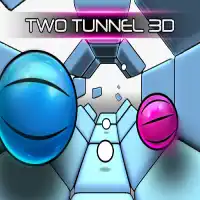
Two Tunnel 3d is a fast‑paced arcade title that challenges players to navigate converging pathways within a minimalist 3‑dimensional environment. The game emphasizes reflexive decision‑making, precision timing, and an intuitive control scheme that accommodates both keyboard and controller input.
Game Overview and Core Experience
The central premise revolves around guiding a luminous sphere through an endless series of tunnels that intersect and diverge. Each level introduces subtle variations in speed, obstacle placement, and visual orientation, compelling players to adapt strategies in real time. Progression is measured by distance traveled and accumulated score, encouraging repeated play to achieve higher milestones.
Control Scheme and Accessibility
Players can steer the sphere using arrow keys or the WASD layout for movement, while mouse clicks trigger short bursts of acceleration. The control mapping is fully customizable, allowing users to remap inputs to suit personal preferences. Accessibility options include adjustable sensitivity settings and optional audio cues that signal upcoming turns.
Visual Design and Aesthetic Direction
The artwork adopts a sleek, neon‑infused aesthetic that blends geometric simplicity with atmospheric lighting. Minimalist textures reduce visual clutter, ensuring that the player’s focus remains on spatial awareness and reaction speed. Background elements such as distant silhouettes and subtle particle effects enhance depth without overwhelming the core gameplay.
Levels and Progression Mechanics
Although the game features an infinite runner format, it incorporates milestone markers that unlock new visual themes and subtle gameplay modifiers. These milestones are triggered by reaching predefined distance thresholds, and each unlock introduces a distinct color palette and background rhythm.
- Early Stage: Short tunnels with straightforward turns.
- Mid‑Stage: Introduces split pathways and rotating obstacles.
- Advanced Stage: Implements variable speed zones and multi‑directional intersections.
Scoring System and Leaderboards
Scoring is based on distance covered, successful navigation of obstacles, andCombo multipliers earned by chaining consecutive turns without error. A global leaderboard displays top scores, fostering competition and encouraging skill refinement. Seasonal events periodically refresh the leaderboard with themed challenges and exclusive rewards.
Community Features and Multiplayer Integration
Two Tunnel 3d includes a lightweight multiplayer mode where players can race against friends in real time. Matchmaking pairs participants of similar skill levels, and the mode supports voice chat integration for coordinated competition. The community hub on the official site provides forums, strategy guides, and user‑generated content sharing.
How to Join the Community
Participation is straightforward:
- Visit the official portal at KBH Game.
- Create a free account to save progress and access leaderboards.
- Download the game client or launch the browser‑based version.
- Engage with other players through forums and scheduled events.
Development Updates and Future Roadmap
The development team regularly releases patches that refine balance, introduce new visual themes, and expand multiplayer functionalities. Upcoming features include cooperative challenge modes, customizable avatar skins, and seasonal tournaments that reward top performers with exclusive in‑game items.
Technical Requirements and Platform Availability
Two Tunnel 3d is designed to run efficiently on both desktop and mobile browsers, requiring minimal hardware resources. The game supports WebGL rendering, ensuring smooth frame rates even on modest devices. Users can access the game directly through the official site without the need for additional downloads.
User Tips and Advanced Strategies
Advanced players often employ the following techniques to maximize performance:
- Anticipate Turns: Observe subtle changes in tunnel curvature to prepare early.
- Manage Boost Timing: Use acceleration bursts at the onset of sharp turns to maintain momentum.
- Optimize Path Selection: Prioritize lanes with fewer obstacles when high scores are the objective.
- Practice Rhythm: Develop a consistent tempo to synchronize movement with visual cues.
Play Two Tunnel 3d for free on KBH Games, the top destination for KBH Games unblocked in the USA! Enjoy thousands of top-tier, browser-based games with no ads and instant access—perfect for school, work, or home. Whether you love action, puzzles, or sports, start playing with just a click or keyboard tap!
Why Choose KBH Games?
Unblocked games are a lifesaver when gaming sites are restricted. At KBH Games, we offer:
- Thousands of Games: Action, puzzles, sports, and more.
- No Downloads: Play instantly in your browser.
- Ad-Free Experience: Focus on fun, not pop-ups.
- Accessible Anywhere: Bypass school or work filters with ease.
Our platform is your go-to hub for free unblocked games, delivering endless entertainment wherever you are.
How to Play Unblocked Games on KBH Games
Getting started is simple! Follow these steps to enjoy unblocked games on KBH Games:
- Visit the Site: Open Chrome, Firefox, or Edge and go to KBH Games. No downloads needed!
- Browse Games: Explore our library of unblocked games—action, adventure, puzzles, and more.
- Pick a Game: Click a title to launch it in fullscreen mode instantly.
- Play Right Away: Most games load in seconds. Adjust settings if available.
- Bypass Blocks: Use our .io/GitLab link to access games on restricted networks.
- Enjoy Ad-Free Fun: Immerse yourself without interruptions.
Game Controls for Top Unblocked Games
Master your favorite unblocked games with these common controls. Check each game’s instructions for specifics.
Action & Platformers (e.g., Stickman, Retro Bowl)
- Arrow Keys/WASD: Move or jump.
- Spacebar: Attack or special moves.
- Shift: Sprint or dodge.
- Mouse Click: Aim or interact.
Puzzles & Strategy (e.g., 2048, Geometry Dash)
- Arrow Keys: Navigate elements.
- Mouse Click/Drag: Select or move items.
- Spacebar: Pause or confirm.
- Enter: Start/restart.
Sports & Racing (e.g., Slope Game)
- Arrow Keys/WASD: Steer or move.
- Spacebar: Jump or accelerate.
- Shift: Brake or boost.
- Mouse: Adjust angles.
Multiplayer & Arcade (e.g., Slither.io)
- Mouse: Guide your character.
- Left Click: Boost or activate.
- Arrow Keys: Move (some titles).
- Spacebar: Pause or special moves.
Tips for Smooth Gameplay on KBH Games
Maximize your fun with these pro tips:
- Read Instructions: Check tutorials on the start screen.
- Adjust Settings: Tweak graphics for lag-free play.
- Use Responsive Gear: Ensure your keyboard/mouse works well.
- Bookmark Us: Save KBH Games for quick access.
- Troubleshoot: Refresh or switch browsers if needed.